Function showMessage
Parameters
- ctx: Context
The context to render to.
- options: ShowMessageOptions
Configuration for the dialog.
Returns Promise<MessageBubbleReturnValue>
The button that was pressed.
Remarks
- To prevent background interaction, use
overlay - To blur the background, use
blurandblurIntensity - The
textof the message is parsed as Markdown, but it's also possible to pass ReactNodes.
Import BackgroundReact when passing ReactNodes.
import {BackgroundReact as React} from '@matterway/background-react';Any number of buttons can be specified, of which the "main" action should be the last. By default, the dialog presents a single
Proceedbutton with valueok.Resolves when the user clicks one of the buttons, with the
valueof the button that was clicked.Example
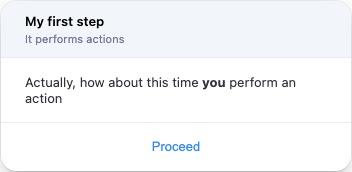
const {button} = await showMessage(ctx, {
title: 'My first step',
description: 'It performs actions',
text: 'Actually, how about this time **you** perform an action',
});
Example
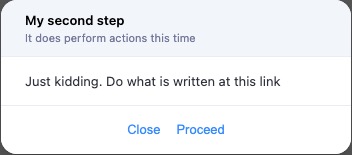
const {button} = await showMessage(ctx, {
title: 'My second step',
description: 'It does perform actions this time',
text: (<div>Just kidding. Do what is written at this <a>link</a></div>),
buttons: [
{text: 'Close', value: 'cancel'},
{text: 'Proceed', value: 'ok'},
],
overlay: true,
overlayProps: {
blur: true,
blurIntensity: 2,
background: 'grey',
}
});
- ctx: Context
Renders a dialog with a text message.
It displays a bubble with a text message, header and navigation buttons, and waits until the user clicks one of the buttons.
Common uses for this dialog are: